

Founder of Travel Camera Truth and Big T Honest Reviews, sharing honest, practical camera and travel-gear guidance based on real-world use.
DJI Neo 2 for Travel: A Beginner’s Guide to Flying and Filming
By Tony “Big T” | Updated September 26, 2026
Before taking my DJI Neo 2 to Custer State Park, I practiced at the local drone park in my town. Custer was my first travel flight with it, and I spoke with rangers beforehand to find out where I could film. I later used the Neo 2 in Utah, outside the national parks, after asking rangers for guidance there as well.
I found the Neo 2 easy to use, especially after taking the time to practice close to home. This guide combines that personal experience with DJI’s published specifications and official flying guidance, so you can plan both the footage and the places where you are allowed to capture it.
Quick Answer
The DJI Neo 2 is worth considering for solo travelers who want a small drone for short aerial clips, selfies, and follow shots. Palm takeoff and automated filming make it approachable, while an optional controller offers more deliberate control. Its main trade-offs are short battery endurance, a small camera sensor, and internal storage that you cannot expand with a memory card.
My experience at Custer State Park and in Utah is why I see the DJI Neo 2 for travel as more than a list of features. It gave me another way to film the places I visited. My advice is to practice before the trip, ask about the location’s rules, and pack extra batteries for a longer day of filming.
Key Takeaways
- My experience: local drone park practice came first, followed by my first travel flight at Custer State Park and later filming outside Utah’s national parks.
- Best fit: travelers and beginners interested in quick daylight video, personal travel clips, and automated shots.
- Small kit: DJI lists the base aircraft at approximately 151 g; accessories add weight.
- Camera: a 12 MP, 1/2-inch sensor, two-axis mechanical gimbal, 4K video, and a vertical recording option.
- Battery and storage: plan for short flights and regular footage backups rather than uninterrupted filming all day.
- Location matters: Custer is a state park. U.S. national parks follow different rules, and a drone’s small size does not create permission to fly.
- Pack extra batteries: spares give you more separate flights and filming opportunities; they do not extend a single battery’s uninterrupted flight time.
What is the DJI Neo 2 and how does it work?
The Neo 2 is a compact camera drone built around easy takeoff and automated filming. You can select a shooting mode, launch from your palm, and let the drone frame a short sequence. Depending on the control method and mode, you can also use gestures, a connected phone, or compatible DJI remote-control equipment.
That is useful when you are traveling alone and want to appear in the scene. Instead of leaving a camera on a tripod, you can record yourself with some of the surroundings visible. You still need to choose a clear flight area and understand how to stop the maneuver.
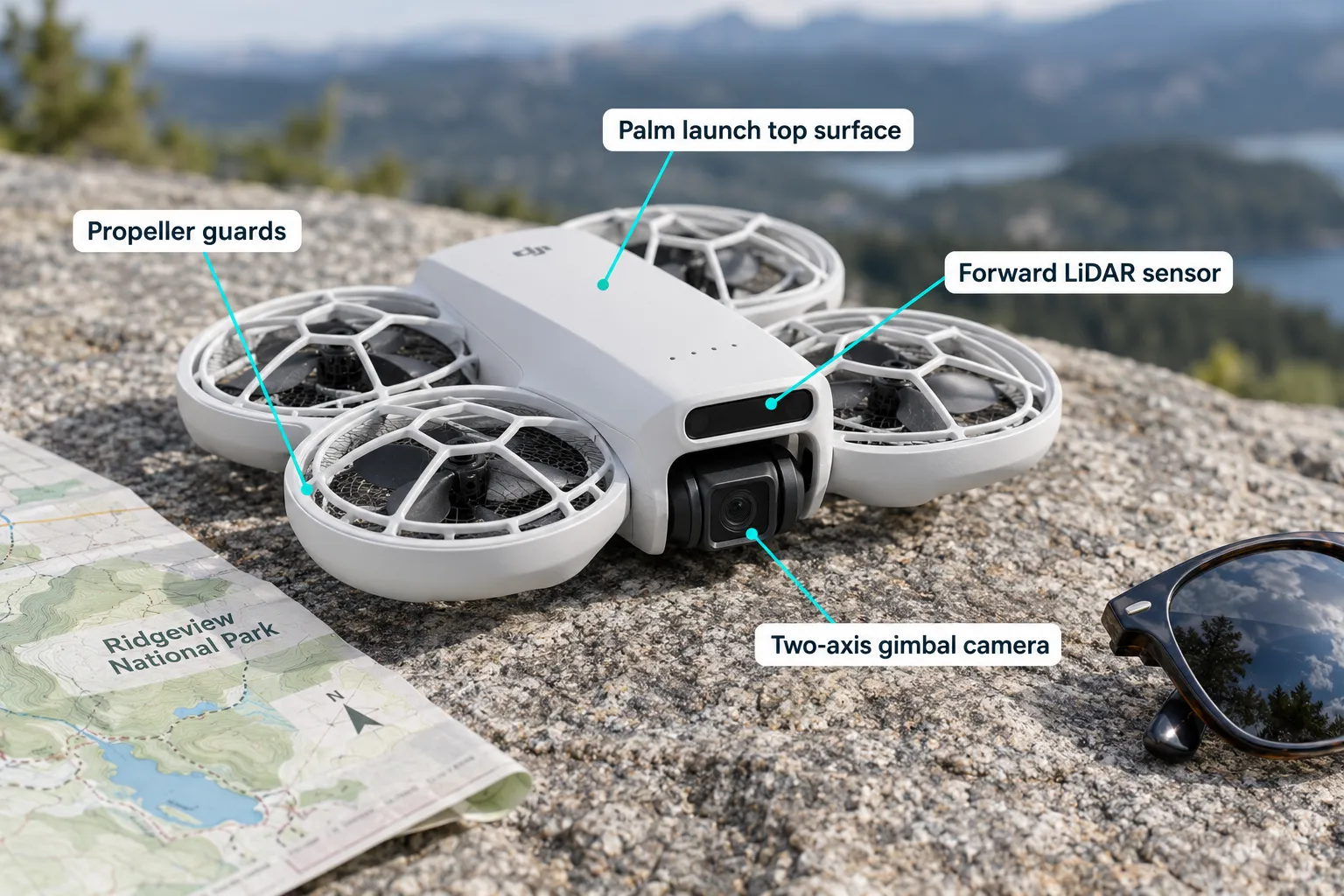
Propeller guards and obstacle sensing provide assistance, but they do not make contact with trees, people, or buildings safe. Learn the controls in open space first. For activation, charging, and setup, start with DJI’s Neo 2 beginner guide and the tutorial below.
Watch: DJI Neo 2 beginner guide
Setup, charging, DJI Fly, palm launch, and controller flight. Video by Air Photography; this is an independent tutorial, not my flight footage.
DJI Neo 2 specifications at a glance
These manufacturer specifications explain the Neo 2’s capabilities. My personal observations concern using it on trips; the figures below are DJI’s published ratings, not measurements from my flights. See DJI’s product information for equipment requirements and regional details.
| Feature | Published specification | Travel consideration |
|---|---|---|
| Base weight | Approximately 151 g | Weigh the complete flight configuration if adding accessories. |
| Camera | 12 MP, 1/2-inch CMOS; f/2.2 | Prioritize good light and realistic expectations for cropping. |
| Mechanical stabilization | Two-axis gimbal | Helps stabilize the camera during flight. |
| Horizontal video | Up to 4K/60 fps; 4K/100 fps slow motion | The slow-motion option requires a compatible remote or motion controller. |
| Vertical video | 2.7K | A useful format for Shorts and Reels. |
| Storage | 49 GB internal; no microSD slot | Back up files during the trip. |
| Maximum flight time | About 19 minutes; about 17 with propeller guards | Manufacturer figures; actual endurance varies. |
| Sensing | Omnidirectional vision, forward LiDAR, downward infrared | Assistance with limitations, not a guarantee against collisions. |
Who is the DJI Neo 2 for travel designed for?
I would put the Neo 2 on the shortlist for a traveler who wants to add a few aerial scenes to an otherwise ground-based video. Its appeal is convenience: capture an establishing shot, put yourself in the frame, and continue enjoying the location.
- Solo creators: automated shots can help you film yourself without a second camera operator.
- First-time pilots: simple filming modes provide an introduction, alongside learning flight safety.
- Travelers packing light: a small aircraft is easier to justify bringing, although the full kit still needs space.
- Short-form video makers: vertical footage can complement smartphone and action-camera clips.
It is less compelling if your priorities are long flights, extensive photo cropping, or demanding low-light work. Consider the shots you want to make before choosing a kit.
DJI Neo 2 weight and portability: can you take it on a plane in carry-on luggage?
For most trips, I would pack the aircraft in a protective carry-on case. Spare lithium batteries and power banks must stay in carry-on baggage under FAA guidance, with their terminals protected against short circuits. If your carry-on is gate-checked, remove those spares and keep them in the cabin.
There is no blanket FAA two-spare limit for ordinary small drone batteries. The FAA’s two-spare limit applies to larger batteries in the 101–160 Wh category with airline approval. Airlines may impose additional restrictions, so check the carrier’s policy and the Wh rating on each battery. Rules for batteries installed in equipment are separate.
- Protect the aircraft. Use its gimbal cover and a case that does not press on the camera or propellers.
- Separate spare batteries. Prevent exposed contacts from touching metal objects.
- Check your airline. Confirm battery allowances, packing requirements, and any power-bank restrictions.
- Check your destination. Confirm that bringing a drone into the country is allowed before departure.
Use the FAA’s PackSafe lithium battery guidance as your starting point. The aircraft’s bare weight is not the same as your packed weight: include the case, charger, controller, and spare batteries.
DJI Neo 2 camera quality for travel vlogging: what it does well and where it falls short
For a travel vlog, the most useful drone clip is often a brief view that shows where you are. It does not need to be a long flight. A simple scene-setting shot can connect your ground footage to the wider landscape.
What looks useful on paper: the Neo 2’s video formats cover both horizontal travel videos and vertical social posts. Its automated framing can also help a solo traveler appear in the footage. DJI documents the camera and recording features on its Neo 2 product page.
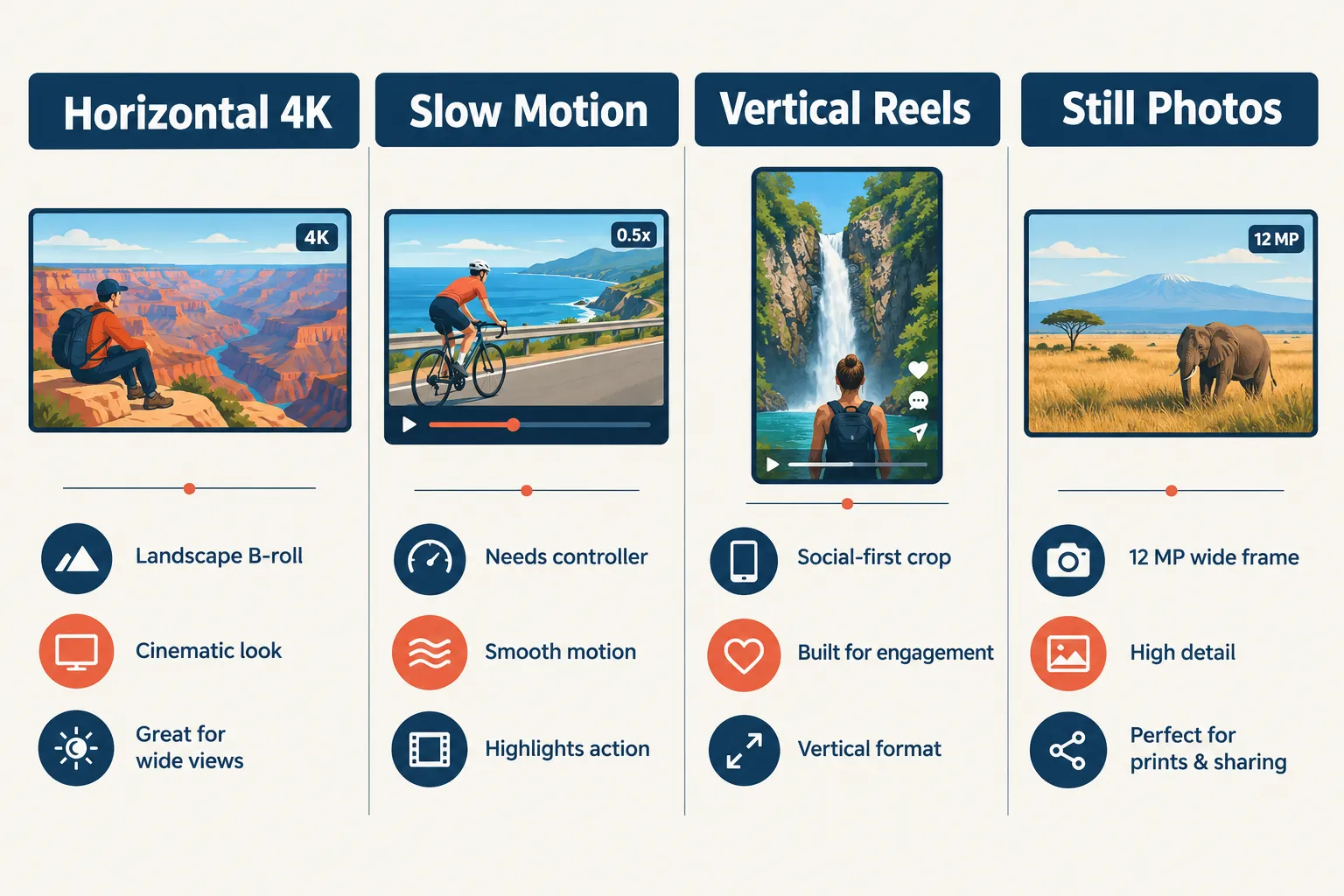
Where I would set limits: a small sensor leaves less flexibility for heavy cropping and difficult lighting than a larger-sensor camera. I would plan drone scenes around good daylight, keep movements uncomplicated, and use my ground camera when the light fades. See my travel camera roundup for other parts of a travel kit.
My priority for a travel drone is simple: help me show the location clearly, then let me get back to the trip.
DJI Neo 2 controller options: do you need the remote?
You do not need a traditional remote for every Neo 2 filming mode. The right setup depends on whether you want quick automated shots or more control over the route and framing.
- Palm, gestures, and phone: useful for short, simple shots with less equipment. Voice control requires a compatible phone connection; it is not a standalone microphone inside the aircraft.
- Compatible standard controller: my preference for learning deliberate camera movements and managing framing with physical sticks. Check that the kit includes the required Neo 2 Digital Transceiver.
- Motion controller and goggles: an optional FPV setup with more equipment to learn and carry. Arrange a compliant visual-line-of-sight setup, including a visual observer when required.
Check the exact controller, goggles, transceiver, and firmware combination with DJI before buying. Do not assume that a controller you already own will work. DJI also states that 4K/100 fps slow motion requires remote or motion control.
Watch: DJI Neo 2 Gesture Control and Voice Control
A demonstration of hands-free control and repositioning. Video by Air Photography; this is an independent tutorial, not my flight footage.
Which DJI Neo 2 kit should you buy? Price and where to buy
I would choose the kit around how you plan to fly. If you want hands-free clips, a controller-free bundle may be enough. If you want to practice traditional flying and frame scenic shots more precisely, compare a standard-controller bundle.
Pricing note: bundle names, availability, and prices differ by region. I have not verified a current U.S. price or official U.S. stock, so I am not presenting overseas prices as U.S. offers. Confirm the seller, included accessories, warranty region, and return terms before ordering.
| Kit type | Typical purpose | What to verify | Price |
|---|---|---|---|
| Drone only | Lightweight kit for automated filming | Battery, guards, and charging requirements | Check current regional listing |
| Fly More, without controller | Extra batteries for several short sessions | Battery count and hub; controller may not be included | Check current regional listing |
| Fly More, with controller | Stick control and more deliberate framing | Exact remote, transceiver, batteries, and hub | Check current regional listing |
| Motion Fly More | Goggles and motion-control flying | Compatible goggles, motion controller, and transceiver | Check current regional listing |
My starting choice would be a standard-controller kit if learning traditional flying is part of the goal. I would buy the goggle setup only if FPV is something I specifically want to learn.
Watch: DJI Neo 2 FPV Guide for Beginners - DJI Goggles and Motion 3 Controller
Goggle setup, controller functions, takeoff, and landing. Video by Air Photography; this is an independent tutorial, not my flight footage.
How long does the DJI Neo 2 battery last on a trip?
DJI’s beginner guide lists approximately 19 minutes, or 17 minutes with propeller guards. Treat those as manufacturer figures, not a promise for each flight. Wind, temperature, maneuvering, accessories, and the reserve needed to land all affect usable time.
Bring extra batteries if you want more flying time during your trip. That is one of the practical recommendations I would pass on from using the Neo 2 at Custer State Park and in Utah. When you have time to film in a permitted location, spare charged batteries let you land, swap batteries, and make another flight instead of stopping to recharge.
For a longer filming session or several stops in one day, I would plan around three batteries in total and a compatible charger. Extra batteries mean more separate flights, not one long continuous flight. Always land with a safe reserve, and let batteries cool as required before charging.
- Start close. Learn how quickly your battery drops in the conditions you are actually flying.
- Return early. Allow extra reserve for wind, a missed approach, or an occupied landing area; never wait for a fixed percentage if conditions call for landing sooner.
- Charge appropriately. Match the USB-C charger and power bank to DJI’s requirements; a small phone charger may charge slowly.
- Keep the kit simple. Spare batteries, a suitable charger, a clean lens cloth, and a protective case come before optional accessories.
For ground footage between flights, my tripod comparison covers another way to film yourself while traveling.
DJI Neo 2 storage and memory card requirements
The Neo 2 has 49 GB of internal storage and no microSD slot. That changes the packing routine: carrying spare cards will not expand its recording capacity.
- Transfer footage using DJI QuickTransfer or a supported USB data connection.
- Play back several transferred files to confirm they open correctly.
- Keep a second copy of important clips before deleting the aircraft’s originals.
- Check free space before heading out the next day.
DJI’s photo and video export guide explains transfer options. For putting the clips together, see my video editing software guide.
Is the DJI Neo 2 a good fit for your travel style?
The DJI Neo 2 is most appealing when you want short automated shots, palm-launch convenience, and a compact filming kit. Think about your usual trips: do you have permitted places to fly, time for a few short sessions, and a way to back up footage? Those practical questions matter as much as the feature list.
Where can you fly the DJI Neo 2 for travel? Start with the FAA
In the United States, first establish whether your flight is purely recreational or has a non-recreational purpose. Being unpaid does not automatically make it recreational. Filming to support a business website or creator business generally falls under Part 107.
- Recreational basics: complete TRUST, carry proof, follow a recognized community-based organization’s safety guidelines, yield to other aircraft, and maintain visual line of sight.
- Airspace: recreational flights in uncontrolled airspace are limited to 400 feet above ground. Controlled airspace requires prior authorization and compliance with its altitude limits.
- Registration: the under-250 g exception applies only to qualifying recreational use. Part 107 aircraft must be registered, including small ones.
- Remote ID: registered aircraft must comply with the applicable Remote ID rules. Confirm your exact aircraft’s capabilities; do not assume an imported model automatically complies. An FAA-recognized identification area offers an alternative under its conditions.
Check the FAA’s recreational guidance, registration page, and Remote ID guidance. Land-use permission is a separate question from airspace authorization. Recheck temporary restrictions on the day of your flight.
Can you fly a drone in a national park?
For ordinary travel filming, treat U.S. national parks as off-limits to your drone. The National Park Service generally prohibits launching, landing, or operating from its lands and waters without specific authorization. That is why my Utah flights were outside the national parks. A short flight or a small aircraft does not create an exception.
Flying from outside a park boundary is not a universal workaround. The NPS explains that it does not control launch sites outside its boundaries, but you still need permission for that location, compliant airspace, and a lawful operation. Wildlife harassment, dangerous flying, and unreasonable disturbance can create violations even when you took off elsewhere.
Read the NPS drone guidance and check the specific park before planning a flight nearby. For a Black Hills trip, my Mount Rushmore visitor guide can help with the ground-based part of the visit.
Custer State Park and the DJI Neo 2 for travel in South Dakota
Custer State Park was my first travel flight with the DJI Neo 2 after practicing at my local drone park. Before flying at Custer, I talked with rangers about the proper locations to film and where I could and could not use it. I wanted to understand the location before putting the aircraft in the air.
I found the Neo 2 easy to use there. Practicing at home first meant I was not introducing myself to the drone for the first time on the trip. Being able to use it in a scenic travel setting was the next step after those local practice sessions.
That is the order I recommend to another beginner: practice locally, speak with park staff, then fly only in a suitable permitted location. A conversation with a ranger is valuable guidance, but any required permit or airspace authorization still needs to be obtained.
Custer is a South Dakota state park, not a national park. Confirm current rules for your intended flight; a Neo 2 cannot automatically be flown anywhere in the park.
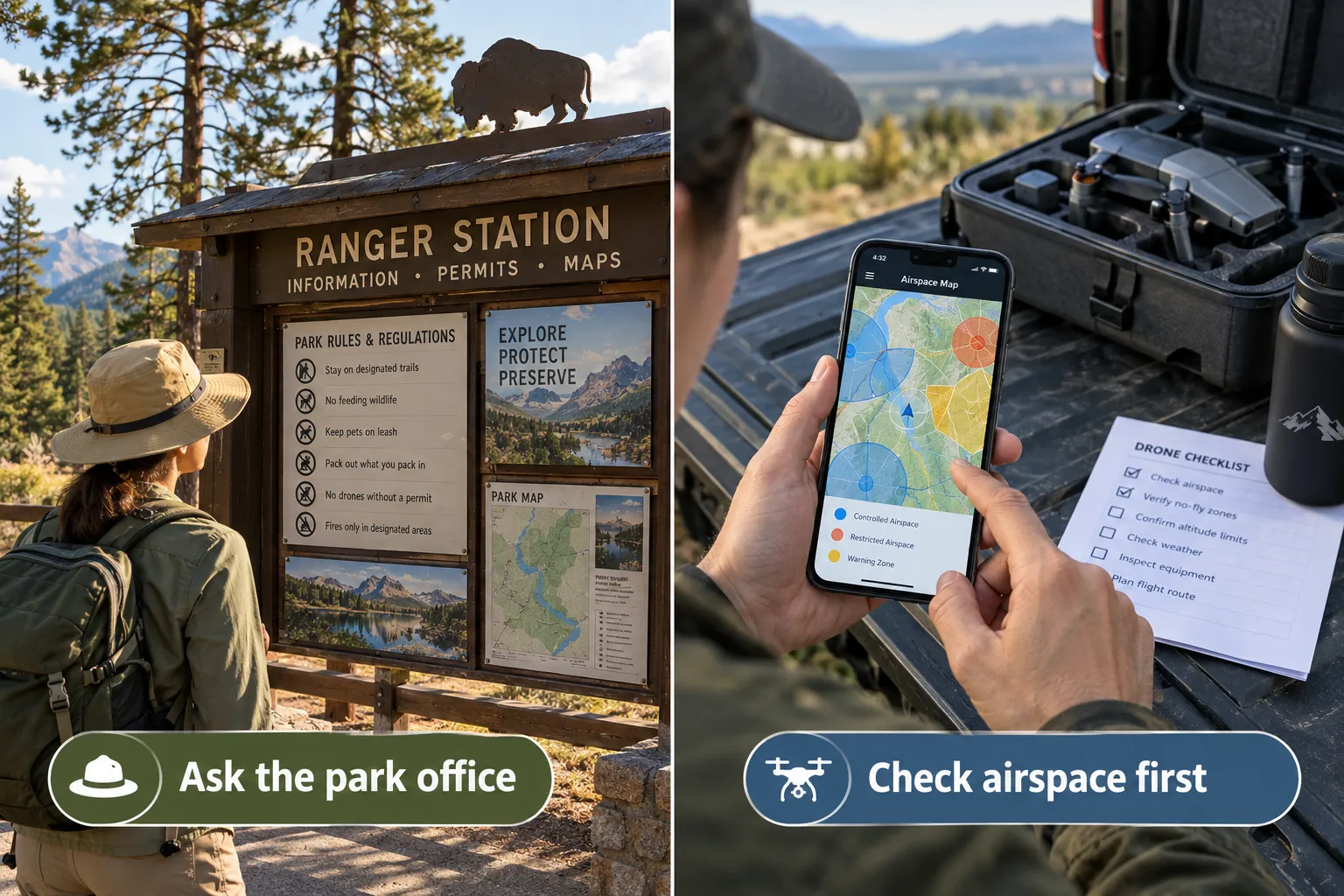
South Dakota Game, Fish and Parks publishes a Drone Usage section in its park regulations. It addresses daylight operation, visual line of sight, wildlife, privacy, other visitors, and commercial filming. Its posted registration wording is broader than the FAA’s recreational weight exception; ask the park how its requirements apply to your aircraft.
- Contact the park before flying. Confirm your intended launch area, current closures, and any required authorization.
- Ask about filming permissions. Website or business footage may require park permission in addition to FAA compliance.
- Keep clear of wildlife and visitors. Do not use a drone to approach, follow, or disturb bison.
- Check event restrictions. Special events can change what is permitted; do not assume normal access applies.
The official Custer State Park page is the place to find current visitor information and park contacts. A ranger’s guidance helps you plan, but any required permit still needs to be obtained.
Practicing at a designated drone park
I practiced with my DJI Neo 2 at the local drone park in the town where I live before taking it to Custer State Park. That practice was an important part of preparing for my first travel flight. I could spend time getting familiar with the drone close to home before adding an unfamiliar destination to the experience.
For a beginner, I would use those local sessions to learn takeoff, hovering, gentle movements, stopping a shot, and landing. You do not need a dramatic location to learn the basics. A suitable designated flying area gives you somewhere to build familiarity before a vacation.
A drone park is not automatically exempt from airspace rules. Check field boundaries, hours, membership requirements, and current restrictions. If the field is an FAA-recognized identification area, confirm the conditions that apply rather than assuming every drone park has that status.
Using the DJI app to plan local practice
I also used the DJI app when looking into local places to fly. It is useful as a starting point for planning recreational flying around home, but I would not treat an app display as permission to take off.
DJI says its FlySafe information is advisory and does not replace official aviation-authority data. Cross-check airspace through a service listed on the FAA’s B4UFLY page, obtain airspace authorization when required, and separately check the drone park or landowner’s rules. An app that lets the aircraft launch does not prove the location is legal.
My DJI Neo 2 experience in Utah outside the national parks
I also flew my DJI Neo 2 in Utah, outside the national parks. Before filming, I consulted rangers about where I could and could not fly. Their guidance helped me understand which locations to consider and which places to leave out of my filming plans.
My approach was to enjoy the national parks from the ground and look for permitted flying locations elsewhere. Being outside a national park is a starting point for checking the rules, not automatic approval: neighboring land may have its own owner, manager, wilderness designation, or closure.
If you are planning a similar trip, ask rangers for local guidance and confirm the requirements with whoever manages the actual launch site. That is especially useful in the West, where different types of public land can sit close together. My experience is a reason to ask first, not a promise that someone else’s flight will be permitted.
What countries allow the DJI Neo 2? Restrictions by location
There is no single worldwide permission for a small drone. Import rules, operator registration, flight categories, insurance, and site restrictions vary. Research the destination before packing the aircraft.
- Find the country’s official civil aviation authority guidance for visiting pilots.
- Check customs rules and whether a drone can be brought into the country.
- Confirm registration, operator identification, training, and insurance requirements.
- Check restrictions at the actual beach, park, historic site, or accommodation.
- Keep required documents available during the trip.
Do not apply the U.S. recreational weight exception to another country. If official guidance is unclear, ask the relevant authority before traveling.
Best travel destinations for DJI Neo 2 drone footage
The best location is one where permission, space, weather, and the shot you want all line up. An impressive view alone is not enough.
- Designated flying fields: useful for learning within the operator’s rules.
- Private property with permission: potentially suitable when airspace and other requirements also allow the flight.
- Authorized open recreation areas: choose clear space away from visitors and wildlife.
- Permitted scenic stops: plan a short shot with an unobstructed return and landing area.
Public land, a quiet road, or an empty beach is not automatically a legal launch site. Research the managing agency and avoid assuming that a map app’s clear airspace display grants ground permission. My travel reviews can help with the rest of your trip planning.
Where to research permitted Neo 2 flights in the West
These are places and land categories to research, not a list of locations where I personally flew. Rules can change, and the final decision depends on the exact site, date, airspace, and purpose of the flight.
| Place or land type | What to check | Official starting point |
|---|---|---|
| Goblin Valley State Park, Utah | A potential permit-based option. The park requires a drone permit year-round, limits flying areas, and restricts busy-season days and permit availability. Ask the visitor center before making plans. | Park drone regulations |
| BLM-managed land in Utah | Check the exact parcel with the field office. The Grand Staircase-Escalante fact sheet warns that special designations change the rules and directs takeoffs and landings to designated routes. Do not assume all BLM land is open. | BLM drone fact sheet |
| National forest land in western states | Some areas may support recreational flying subject to FAA and local rules. Check with the ranger district; do not launch, land, or operate from designated wilderness, and avoid closures and wildfire operations. | Forest Service recreational drone guidance |
| Designated local flying fields | Check the field operator’s rules, hours, any membership requirements, and airspace. This is the type of setting I used to practice before traveling. | FAA-listed airspace-planning services |
Outside a national park can still be off-limits. For example, BLM’s current Bears Ears visitor guidance prohibits public drone use except through narrow formal authorizations. Never assume “national monument,” “public land,” or an empty landscape means you can fly.
For my next western trip, I would contact the local land manager with the proposed launch point and date, then check airspace and closures again before flying. Rangers can help you understand the area or point you to the right office; they cannot grant permission for land or airspace outside their authority.
DJI Neo 2 wind resistance: how windy can it really fly?
Do not treat a published wind-resistance rating as a recommended beginner flying condition. Gusts, exposed terrain, and wind at the drone’s altitude can make a flight more difficult than it feels at ground level.
I would choose a calm, open location for early flights and keep the aircraft nearby. Watch its ability to hold position and respond to warnings. If it is struggling, bring it back while you still have options.
- Check both average wind and gust forecasts.
- Leave enough battery for a return against the wind.
- Avoid exposed ridges and turbulent areas around buildings.
- Skip the flight when conditions are beyond your ability or the aircraft’s limits.
Choose conditions within your ability and DJI’s operating limits. A published wind-resistance rating is not a guarantee that a particular flight will be safe.
DJI Neo 2 beginner tips and common mistakes to avoid
My advice is to make the first flights simple. The goal is to understand what the aircraft does, how to stop a shot, and how to land comfortably.
- Set up before the trip. Activate the aircraft, read its manual, and check the app and firmware at home.
- Inspect the flight path. Look for wires, thin branches, fences, people, and places the camera cannot show clearly.
- Understand the selected mode. Tracking, gestures, and controller flight do not all behave the same way.
- Keep watching the aircraft. The live camera view does not replace visual line of sight.
- Plan the landing first. Leave room and battery for a safe return.
- Back up footage. Check internal storage before a new filming session.
- Respect the location. If the flight will disturb people or animals, choose another place or leave the drone packed.
A simple preflight checklist for the DJI Neo 2
Use the same routine at home and when traveling. Familiar equipment does not make a new location familiar.
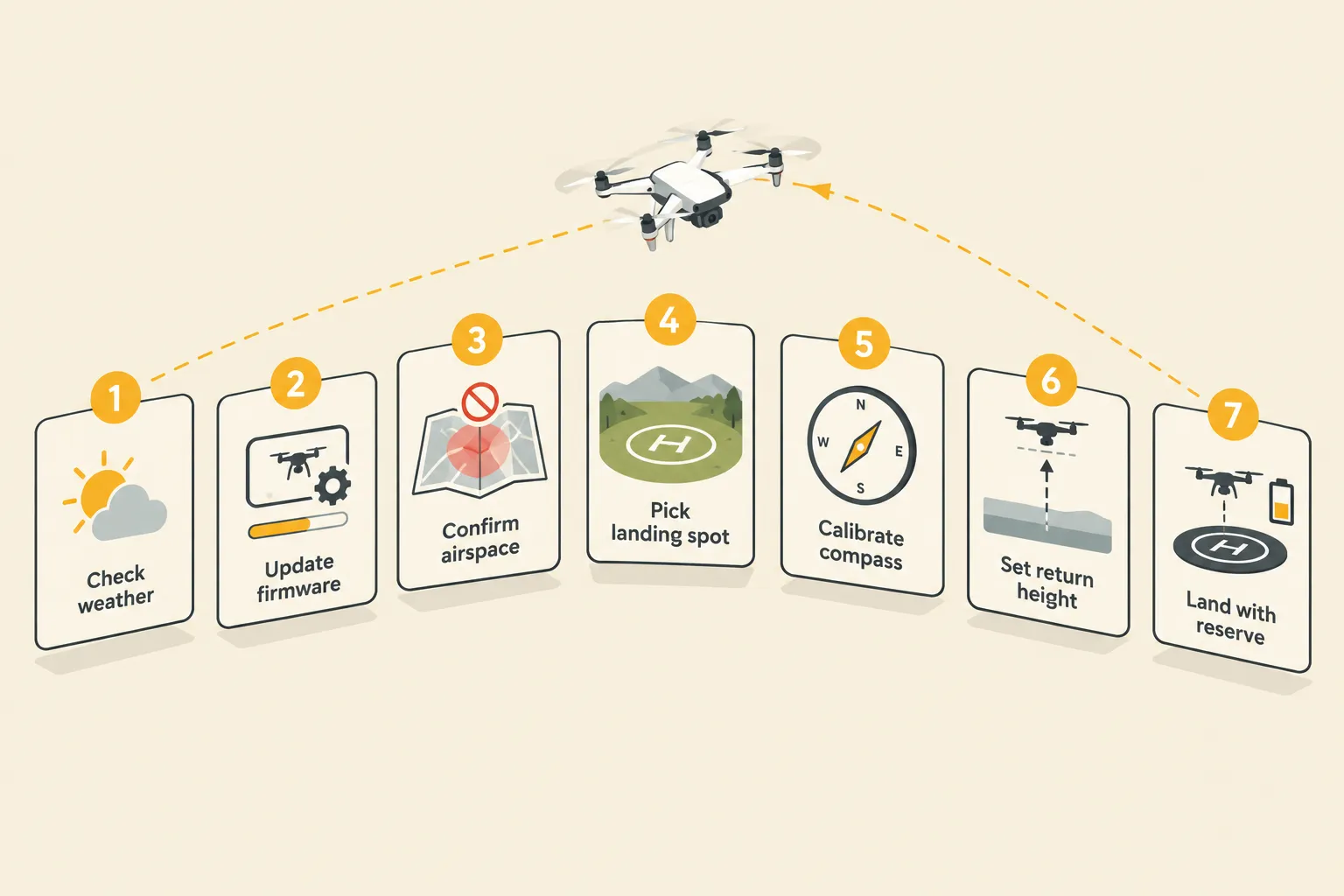
- Permission: confirm the launch site, airspace, and any temporary restrictions.
- Documents: check the training, registration, Remote ID, and permits that apply to this flight.
- Conditions: assess wind, gusts, visibility, lighting, and a clear landing area.
- Aircraft: inspect propellers and guards, secure the battery, remove the gimbal cover, and clean the camera.
- Settings: select the control mode, verify storage and battery, and review the applicable return or landing behavior.
- Route: check for people, wildlife, obstacles, and a backup landing location.
- Reserve: keep the aircraft in sight and return early enough to handle an unexpected delay.
FAQ
Does the DJI Neo 2 need FAA registration?
A drone below 250 g generally qualifies for the registration exception only when flown under the limited recreational exception. Part 107 use requires registration regardless of that small weight. Check your complete flight configuration and the current FAA guidance.
Can I fly it in a U.S. national park?
Generally, you cannot launch, land, or operate from NPS lands or waters without authorization. Check the particular park; the Neo 2’s small size does not change the park rules.
Does the DJI Neo 2 take a microSD card?
No. Its storage is built in, so plan to transfer and back up footage during your trip.
How many batteries should I take?
I recommend extra charged batteries for a longer filming day. Three batteries in total is a useful starting point, depending on your itinerary and charging opportunities. Land and swap between flights; spares do not extend one continuous flight.
Is the DJI Neo 2 useful for YouTube travel videos?
Its published camera features make it a reasonable option for short daylight aerial clips. Evaluate sample footage at your intended viewing size, especially if low light or heavy editing matters to you.
Do I need a remote controller?
Not for every automated filming mode. A compatible remote offers physical-stick control; check the required transceiver and accessories for your chosen setup.
Is obstacle sensing crash-proof?
No. Sensors have limitations, and the pilot still needs to avoid obstacles and choose a suitable flight path.
Can I fly at Custer State Park?
I used my DJI Neo 2 there after speaking with rangers about appropriate filming locations. Check the current rules for your own visit and obtain any required permissions; my past flight does not establish permission for a future one.
Did you practice before flying on your trip?
Yes. I practiced with the Neo 2 at my local drone park before my first travel flight at Custer State Park.
Did you fly inside Utah’s national parks?
No. I flew outside the national parks and consulted rangers about where I could film. You still need to check the rules of the land outside the park and the applicable airspace requirements.
Conclusion: is the DJI Neo 2 the right travel drone for you?
After practicing at my local drone park and using the DJI Neo 2 at Custer State Park and outside Utah’s national parks, I found it an easy way to add aerial filming to my travels. The preparation mattered: learning locally and talking with rangers helped me plan where to use it.
My main advice is to follow that same order, carry extra batteries for more filming opportunities, and keep national parks off your ordinary drone-flight itinerary. A little preparation at home makes it easier to focus on the trip when you arrive.
Start with three steps:
- Choose a suitable place and confirm the rules.
- Select a kit that matches the filming and control options you want.
- Learn the basics locally before relying on the drone for a travel video.
The aim is to bring home a useful view of the trip while keeping the flight simple, considerate, and permitted.
References
- DJI Neo 2 official product information — features and equipment requirements; regional pricing is not a U.S. quote.
- DJI Neo 2 beginner guide — setup, battery information, storage, and support.
- FAA recreational flyer guidance — recreational and non-recreational distinctions.
- FAA drone registration and Remote ID.
- FAA PackSafe: lithium batteries — spare batteries and airline travel.
- NPS uncrewed aircraft guidance — park restrictions and boundary questions.
- South Dakota GFP park regulations: Drone Usage and Custer State Park information.
- DJI FlySafe advisory guidance.
- FAA B4UFLY airspace-planning services.
- Goblin Valley State Park drone regulations.
- BLM Grand Staircase-Escalante drone fact sheet.
- US Forest Service recreational drone guidance.
- BLM Bears Ears current visitor restrictions.
Source review: September 26, 2026. Check current destination, aviation, and airline requirements before each trip. The original article’s illustrations are retained and are not presented as personal flight photographs.
Founder of Travel Camera Truth and Big T Honest Reviews, sharing honest, practical camera and travel-gear guidance based on real-world use.